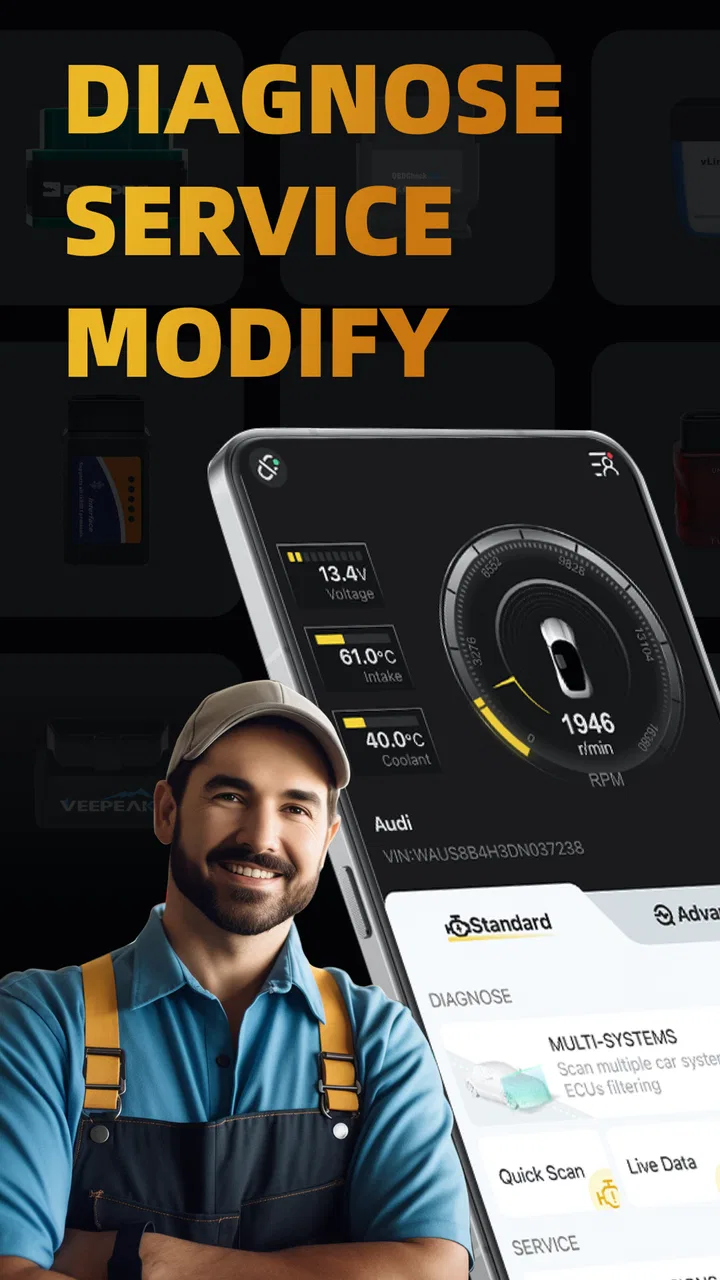
OBDocker - OBD2 Car Scanner
- 4.1
- Rating
- 1.00M
- Installs
- Free
- Price
 Analysis by App-foxy
I approached OBDocker - OBD2 Car Scanner as the kind of tool that might live on a shared household phone rather than belonging to one dedicated mechanic. That distinction matters. A car scanner can be useful to several people in a home, but the person connecting it to a vehicle, clearing a warning, or paying for an optional function should understand what they are doing. In my experience, this app makes the most sense when it is treated as a practical diagnostic companion, not as a replacement for a workshop.
Developed by Motorsure INC., this free Android app sits in the Auto & Vehicles category and is designed around OBD2 vehicle diagnostics, service-related tasks, and modifications. It has reached over a million installs and holds a 4.3 average from roughly thirty-four thousand ratings, which gives it a substantial user base without making it automatically right for every driver. The store short description calls it OBDocker, while its longer positioning presents it as an OBD2 scanner with several jobs in one place.
The app is available to Everyone, and it runs on Android seven or later. Its current version is 3.2.6. Optional purchases range from $0.99 to $119.99 per item, so the free download is only one part of the decision. I would install it first to understand the basic workflow, then decide whether a paid function actually matches my vehicle and my needs.
You May Also Like

 Blood Strike: 2.5 Anniversary
Blood Strike’s Loadouts Turn Every Drop Into a Tactical Gamble
A close look at Blood Strike’s custom loadouts: how fast access to signature weapons reshapes its battle royale rhythm, rewards preparation, and narrows the gap between fights.

 Pandora - Music & Podcasts
Pandora’s Music Is Easy to Start, but Harder to Recover
Pandora’s strength is its low-effort path from a seed to a station. Its weak spot is how much confidence it asks you to place in connection, setup, and quiet recovery.

 8 Ball Pool
 Is Built on Rivalries, Rematches, and Routine
A close look at the rivalries, rematches, shared routines, and unanswered safety questions that turn a quick pool match into a persistent mobile community.

 Samsung Music
’s Quiet Strength Is Playing What You Already Own
Its reach comes less from spectacle than from dependable access to a personal library. That simplicity is both the app’s strongest retention engine and its ceiling.

 AccuWeather: Weather Radar
AccuWeather Review: A Quick, Clear Forecast for Everyday Decisions
For everyday plans, the best forecast is the one you can understand quickly. AccuWeather makes rain timing, radar, and local conditions easy to act on, with a few trade-offs.

 Hill Climb Racing
Why Hill Climb Racing Still Turns Crashes Into One More Run
A tiny car, a bumpy hill and one more upgrade: Hill Climb Racing keeps resurfacing because its simple chaos makes every near-miss feel personal.
More From Our News Desk



How OBDocker Works in a Shared Household
When I use OBDocker in a shared household, I treat it as a common diagnostic tool, not as a shared authority over every car. I’d agree in advance who can connect the adapter and who may clear or change anything, then keep each scan clearly tied to its vehicle. That small routine helps prevent one driver’s findings from being mistaken for another car’s problem.
A realistic weekend use case
Imagine a household with two cars and several people who drive them. One person notices a warning light on the dashboard before commuting, another family member owns the Android phone, and a third person usually handles maintenance conversations. OBDocker can help those people coordinate because the phone becomes a starting point for reading vehicle information instead of relying entirely on a vague dashboard symbol.
The useful workflow is simple in principle: the driver parks safely, connects a compatible OBD2 adapter to the vehicle, opens the app, and checks what the vehicle reports. The result can then be discussed with the person who normally handles repairs. That is more practical than sending a message that only says, “The engine light is on.” A code or live reading gives the conversation a clearer starting point, even though it still requires interpretation.
For a shared device, I would keep the process deliberate. The person who owns the car should be present when possible, and the driver should record which vehicle was connected before saving or discussing readings. If two cars are checked on the same afternoon, mixing up the results is an easy household mistake. A note containing the vehicle, date, dashboard symptom, and scan result is often more valuable than taking several random screenshots.
The best household benefit is shared understanding, not automatic repair advice. OBDocker can help a family decide whether a problem deserves immediate attention, a second opinion, or a planned appointment. It should not be used to reassure someone that a car is safe simply because a scan appears quiet, nor should a code alone be treated as a complete diagnosis.
What the app is good at before a workshop visit
I find this type of scanner most useful before contacting a mechanic. It can help a driver describe a problem more precisely, compare a warning with the car’s recent behavior, and avoid arriving with no information at all. It may also help a technically confident owner monitor a vehicle after maintenance, provided the owner understands what the readings mean and does not confuse a cleared warning with a repaired fault.
That last distinction is important. Clearing a diagnostic trouble code can remove a warning from the dashboard without fixing the underlying cause. If a household member uses a modification or service-oriented function without documenting the original state, the next person may lose useful context. My advice is to capture the original information first and only then consider any action that changes what the car reports.
OBDocker is also more useful for recurring issues than for a single moment of curiosity. If a warning appears intermittently, keeping a simple history of when it happened, what the car felt like, and what the scanner showed can reveal a pattern. The app itself is not a substitute for a full maintenance log, but it can become part of one when the household uses it consistently.
Where the usual alternatives still have an advantage
The usual alternative is a basic code reader used with no app, or a workshop-grade diagnostic system operated by a professional. A simple reader may be cheaper and less distracting, but it often gives less context and depends heavily on the user already knowing how to interpret the result. A professional system is usually the better choice when the issue involves advanced modules, complex drivability symptoms, safety systems, or repairs that require manufacturer-specific knowledge.
OBDocker sits between those options. It is more approachable than relying on a bare reader, yet it does not turn a casual driver into a technician. Its broader service and modification focus may appeal to owners who want more than one-button code reading, but that broader scope also raises the responsibility to understand each action before using it.
For a household with no interest in vehicle data, a mechanic’s inspection is simpler. For someone who only wants to check one warning and never learn what the result means, a specialist may be the better route. I would choose OBDocker when I want to participate in the diagnostic process, ask better questions, and keep some control over the information I bring to a repair conversation.
Setting boundaries before connecting the adapter
The first boundary is physical safety. Scanning should happen while the vehicle is parked, not while somebody is driving and trying to read a phone. If live information is needed during a test drive, a passenger should handle the device, and the driver should concentrate on the road. This sounds obvious, but shared-device situations make casual use more likely: someone may hand over the phone and assume a quick glance is harmless.
The second boundary is vehicle compatibility. OBDocker is built for OBD2 scanning, but the app cannot make an incompatible adapter or vehicle behave like a supported setup. Before blaming the application, I would check the adapter connection, the vehicle’s diagnostic port, Bluetooth or other connection requirements, and whether the car exposes the information I am trying to read. A failed connection is not automatically an app failure.
The third boundary concerns authority. A phone owner may be able to open the app, but that does not mean they should change settings or clear information on somebody else’s vehicle without permission. In a shared home, the car owner, the person paying for repairs, and the person operating the scanner may all be different people. Agreeing on who may read, save, clear, or modify anything prevents unnecessary conflict.
I would also avoid treating the app as a toy for children. The Everyone age context describes the app’s store classification, not a promise that every vehicle-related action is suitable for a young user. A child can observe a scan or help write down symptoms, but an adult should control the adapter, the vehicle, and any function that could affect diagnostic information.
Managing purchases and account expectations
Because the app is free but includes optional purchases, a shared phone needs a clear rule about spending. The listed range runs from $0.99 to $119.99 per item, which is a wide enough gap that nobody should tap through a purchase without checking what it unlocks and whether it applies to the household’s vehicle. I would make the person responsible for maintenance the decision-maker, rather than leaving that choice to whoever happens to be holding the phone.
The app should not be treated as though one purchase automatically solves every vehicle problem. The value of an optional function depends on the adapter, the car, the user’s technical knowledge, and the intended task. A family that only needs basic information may find the free starting point sufficient, while a serious enthusiast may consider a paid capability worthwhile. The important question is not whether the highest-priced option exists, but whether the household can explain exactly why it is needed.
Account boundaries also matter. I would avoid assuming that a scan made by one person is automatically organized for everyone else. Keep vehicle names, screenshots, and notes understandable to the whole household, and do not leave a diagnostic session open when another person needs the phone for unrelated work. If the device is shared widely, a separate maintenance note or household folder can make the information easier to find than relying on memory.
Coordinating drivers, owners, and mechanics
OBDocker becomes more valuable when it supports a conversation instead of creating a private collection of confusing readings. Before scanning, I would ask the driver what happened: Did the warning appear after refueling? Was the engine difficult to start? Did the car lose power? Did the light disappear and return? Those details can be as important as the code itself.
After scanning, I would share the exact result with the vehicle owner and explain what was observed without overstating the conclusion. “The scanner reported this, and the car felt like that” is a responsible handoff. “The app proved the problem is harmless” is not. If a mechanic receives both the scan and the symptom history, the appointment can start with better context.
A useful coordination habit is to separate observation from interpretation. The observation might be a warning light, a rough idle, or a reading that changed. The interpretation is the theory about the cause. Keeping those apart helps prevent one confident household member from turning an early clue into a final diagnosis.
Another non-obvious benefit is continuity between drivers. If one person uses the car during the week and another takes it to the workshop, written notes reduce the chance that important details disappear. This is especially useful when a warning is intermittent. The app can be part of that handoff, but the household still needs a simple system for labeling which vehicle and which event each result belongs to.
Trust, age, and responsible use
The Everyone rating makes OBDocker broadly approachable, but vehicle diagnostics still involve adult judgment. Younger household members may be interested in how the scanner communicates with a car, and supervised involvement can be educational. I would let them help identify the vehicle, record the dashboard message, or organize notes, while an experienced adult handles connection and interpretation.
Trust also applies between adults. A person who knows how to use the app may be tempted to clear a warning before another driver sees it, especially if the dashboard light is annoying. That can make the vehicle seem better temporarily while removing evidence that a mechanic would want. In my view, preserving the original information is the safer household habit unless there is a clear, informed reason to reset something.
I would be cautious with modification-related functions for the same reason. The word “modification” can attract enthusiasts, but changing vehicle behavior or configuration is not equivalent to reading a code. If the user cannot explain what will change, how to restore the previous state, and why the change is appropriate for that specific vehicle, I would stop at information gathering.
Privacy is another practical consideration. Diagnostic results can reveal details about a vehicle’s condition, maintenance history, or ownership situation. On a shared phone, do not assume every user should see every saved record. Keeping the app available to the household does not require sharing all vehicle information indiscriminately.
Technical friction I would expect
The biggest source of frustration may be the connection between the phone, adapter, and vehicle rather than the app’s menus. A scanner app is only as reliable as that chain. If the adapter disconnects, the phone is paired with the wrong device, or the car is not ready for a session, the user may see incomplete results and blame the wrong component.
That is why I would troubleshoot in a fixed order: park safely, confirm the adapter is seated, check the phone connection, start the vehicle only as required by the scanning procedure, and wait for the app to establish communication before interpreting anything. Repeating random taps usually creates more confusion. A calm, repeatable setup is particularly important when several family members take turns using the same phone.
The app’s broad purpose can also create a learning curve. A person looking only for a quick warning-code explanation may find service and modification options unnecessary. Conversely, an enthusiast may appreciate having more tools in one application but still need external repair information for the specific vehicle. The interface can begin the investigation; it cannot remove the need for automotive knowledge.
Device age and Android compatibility deserve a quick check as well. The minimum requirement is Android seven or later, so older phones may qualify on paper, but performance, connection stability, and available wireless support can still affect the experience. I would use the most dependable household phone, not necessarily the oldest spare, especially if the scan is being performed before an important trip.
Who should install it and who should skip it
I would recommend OBDocker to an Android owner who already has, or plans to buy, a suitable OBD2 adapter and wants a more informative way to approach vehicle warnings. It is a good fit for someone who enjoys learning basic automotive concepts, keeps maintenance notes, or wants to communicate more clearly with a repair shop. It can also work well in a household where one technically confident person supports several drivers.
I would be more hesitant to recommend it to a driver who expects the app to identify every fault in plain language and provide a guaranteed fix. I would also skip it for high-stakes diagnosis involving braking, steering, airbags, or other safety-critical systems unless a qualified professional is involved. A scan can be useful evidence, but it should not be the only basis for deciding whether a vehicle is safe.
It is not the best choice for an iPhone household, since the stated minimum operating system is Android seven or later and the app is presented here as an Android application. It is also a poor fit for someone unwilling to deal with an adapter, connection setup, or technical terminology. In those cases, a workshop visit or a simpler reader may save time and reduce mistakes.
My household verdict
After looking at OBDocker through a shared-use lens, I see a practical app with a clear place between a basic code reader and professional diagnostic equipment. Its free entry point makes it easy to try, its large install base suggests broad interest, and its 4.3 average is consistent with a tool that many users find useful while still requiring some responsibility. Motorsure INC. has aimed at more than a single warning-light screen, which gives the app potential value for owners who want diagnostics, service support, and modification-related tools together.
My recommendation is conditional but positive: use it as a structured way to gather information, not as permission to experiment blindly. Label every vehicle, preserve original readings, keep the driver away from the phone while moving, and agree on purchases before anyone uses the shared device. Those small habits make the difference between a helpful household tool and a source of mixed-up records or unnecessary changes.
If I were choosing for a family, I would install it on the most reliable compatible Android phone, let one trusted adult manage advanced actions, and invite other drivers to contribute symptoms and observations. That arrangement respects age, ownership, and account boundaries without pretending the app provides family-management features. OBDocker is worth trying when the goal is better vehicle conversations and more informed maintenance decisions; it is not a substitute for judgment, training, or a qualified mechanic.
FAQs for OBDocker - OBD2 Car Scanner
01What is OBDocker - OBD2 Car Scanner?
OBDocker - OBD2 Car Scanner is a mobile application designed to connect to your vehicle's OBD2 port, providing real-time diagnostics and performance data. It helps users identify potential issues, monitor engine performance, and understand error codes through an easy-to-use interface. This can improve vehicle maintenance and performance.
02How do I connect OBDocker to my vehicle?
To connect OBDocker to your vehicle, you need an OBD2 Bluetooth or Wi-Fi adapter. Plug the adapter into your car's OBD2 port, usually found under the dashboard. Pair the adapter with your smartphone via Bluetooth or Wi-Fi, then open the app to start scanning your vehicle's data seamlessly.
03Is OBDocker compatible with all vehicles?
OBDocker is compatible with most vehicles manufactured after 1996, as these are typically equipped with an OBD2 port. However, compatibility may vary based on the vehicle's make and model. It's recommended to check the app's compatibility list or consult with the manufacturer to ensure it will work with your specific vehicle.
04What features does OBDocker offer?
OBDocker offers a range of features, including real-time data monitoring, error code reading and clearing, fuel consumption tracking, and performance analysis. It also provides detailed graphs and reports to help users understand their vehicle's condition. These tools are essential for proactive vehicle maintenance and improved driving efficiency.
05Is OBDocker easy to use for beginners?
Yes, OBDocker is designed with user-friendliness in mind, featuring an intuitive interface that makes it accessible even to those with little technical knowledge. The app provides clear instructions and visual aids, allowing users to easily navigate through features and understand diagnostic information without the need for extensive automotive expertise.
Pros
- Easy to connect with any OBD2 device.
- User-friendly interface for beginners.
- Real-time data monitoring available.
- Supports a wide range of car models.
- Offers detailed diagnostic reports.
Cons
- Limited features in free version.
- May experience occasional connection drops.
- Some data requires a premium subscription.
- Interface lacks customization options.
- Not compatible with older OBD devices.

OBDocker - OBD2 Car Scanner
Gallery